
You probably don't need more shop management software. You need the software you already have to act like one system, with every tool reading the same customer record. Most independent shops already have plenty. The industry spent years getting shops to go digital, and it worked.
How did your shop end up with so many tools?
A well-run shop might have a shop management system, digital inspections, phones, online scheduling, financing, payments, reviews, call tracking, ad accounts, payroll, and accounting. Each of those was a sensible purchase. Nobody sets out to build a mess. You get there by solving one problem at a time, correctly.
Having a lot of software isn't the same as having software that works together. Your shop gets more digital and more complicated at the same time.
The cost that isn't on the invoice
Every tool has a price on the invoice. The bigger cost is the work between the tools.
Somebody has to move information from one system to another. Somebody has to line up the reports. Somebody has to remember which tool has the right version of a customer's record. Somebody has to notice that the customer who booked online also called yesterday. Somebody has to explain why the ad account says one thing, the website numbers say another, and the shop management system says a third.
That somebody is usually your service advisor, or you on a Friday afternoon.
Here's a hypothetical. Say a tool costs $300 a month and takes fifteen hours of your staff's time each month to keep in step with everything else. Those numbers are made up. The question is real: what does that subscription cost once you count the staff time, the training, and cleaning up the mistakes?
You may not need another dashboard. You may need the ones you have to agree.
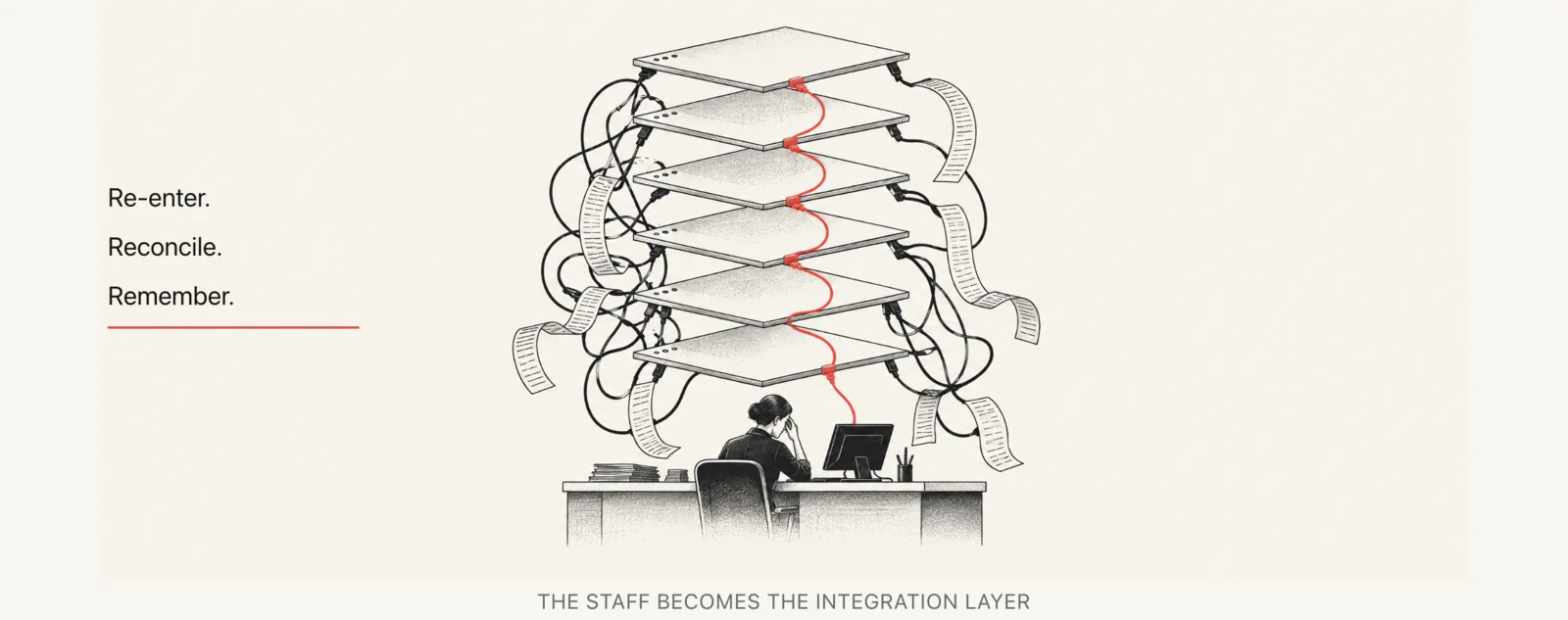
When your tools don't share one customer record, your staff carries the information between them. Fewer tools that read the same record take that job off their desk.
How do you find the handoffs costing you time?
Start with the handoffs, not the next purchase.
- Keep a handoff log for one working week. Ask your team to write down every time they move information from one place to another. Note what started it, which tools were involved, and how long it took.
- Pick one recurring problem. Choose the handoff that happens most often or hurts most when it slips.
- Check what you already own. See whether a connection you already have, or a clearer process, would handle it. Many auto shop software integrations are already paid for and just never got set up.
- Give it an owner. One person makes sure that handoff works.
- Agree which system holds the customer record. When two tools disagree, everyone should know which one wins.
- Measure it. After a few weeks, check whether it took work off someone's plate.
AI helps when the handoff means reading messy text, like an appointment request written in a customer's own words. A summary for the advisor to check can save time there. Copying a confirmed appointment time from one system to another needs a simple rule, not AI. Adding AI to a simple copy job adds cost and one more way to be wrong. The longer version is in AI for auto repair shops.
What does it look like when your shop software works as one?
You need three things. One customer record every tool reads. One view of the week. One person who owns the handoffs.
A customer calls about a noise from the front end. Whoever answers sees the last visit and the open estimate for brakes.
Someone books online after you close. The appointment lands in the schedule with the car and the concern already on it. Nobody retypes it in the morning.
On Friday the call log, the schedule, and the repair orders line up, because they point at the same customers and cars. You spend that afternoon deciding what to do next, not working out which report is right.
We build ours so the website, the phones, booking, reviews, and reporting share one customer record.
This isn't the same as buying one vendor's suite. Buying everything from one company doesn't mean the pieces share a record. It can also tie you to that company's weakest tool. Keep the tools that do their job well. The ones that touch customers should read the same record. Payroll and accounting can keep their own. More on that in how to choose auto repair shop vendors.
Get to one customer record first. Then cut any tool that deals with customers and won't read it.
AI is making shop software easier to build and easier to use
Two things changed in the last couple of years, and both make the one-record setup easier to get to.
Building it got cheaper. Connecting two tools, or getting a small tool that does one job your way, used to mean a developer and a project that ran for months. Now you can describe the handoff in plain words. "When someone books online, put the car and the concern on the schedule, and text me if it's a make we don't work on." Someone with AI at hand can have that working in days. That changes the math on fixing a handoff instead of living with it. It still needs a person who owns it and someone who'll fix it when it breaks.
Using it got easier. Your advisor shouldn't have to learn five menus. With one record underneath, they can ask in plain words. "What's open Thursday for a brake job?" "Text her that the car's ready." "What did we do for this truck last time?" You can ask "how did we do this week?" instead of building the report. The software becomes something you talk to, not something you get trained on. We build ours so an owner can ask about the business in plain words and change the website from the same chat.
None of that works if the tools keep separate records. The assistant can only answer from what it can see.
What should you ask before you buy auto repair software?
Software companies want their product to matter more in your shop. That's their job, and it's fair. Your job is to run a better repair shop, not use more software. Sometimes that means adding a tool. Sometimes it means cancelling one.
Before you sign, ask these:
- Does it read and write the customer record your other tools use? If it keeps its own copy, find out what syncs on its own and what your staff will have to keep in step.
- What work does this remove? Name the task and who does it today.
- What does my staff stop doing? If the answer is nothing, ask what it adds instead.
- What does it replace? A new tool that replaces nothing is one more place to check.
- What happens if I cancel it? If nobody would notice, you've learned something.
Judge the next tool by the work it removes. Features come second.
Questions shops ask
Should I consolidate my shop software or add integrations?
Do whichever gets every tool reading the same customer record. An integration that only copies a customer's name doesn't get you there. Your staff still fills in the rest.
How do I know if my auto shop software integrations are working?
Watch your staff, not the settings page. If people still copy customer names, appointment times, or job totals from one screen to another, the connection isn't doing its job. A working connection moves the fields it covers on its own. Someone still checks it now and then. The odd cases still land on a person.
What does auto repair software really cost?
The subscription is the part you see. It's also the smallest part. Add the hours your staff spends moving information around, the training for each new hire, and the time spent fixing mistakes when two systems disagree. That total is the number to compare against the work the tool saves.
Next step
Software is half the picture. The other half is what customers, Google, and AI systems see before they call. If you want to know how clearly your shop comes across online, start with a free visibility audit. We'll show you what's clear, what's missing, and what to fix first.